

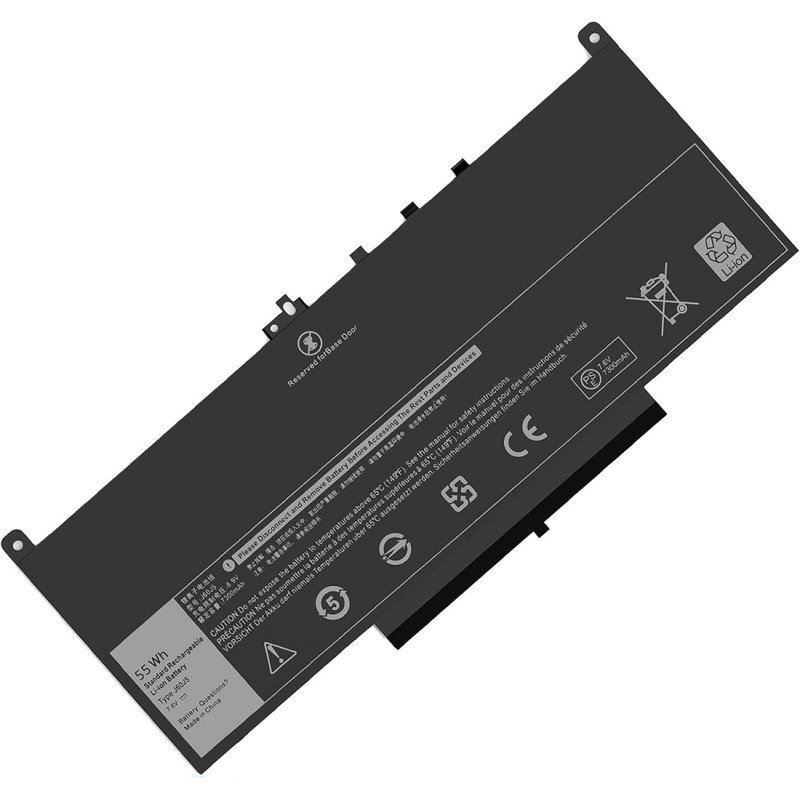
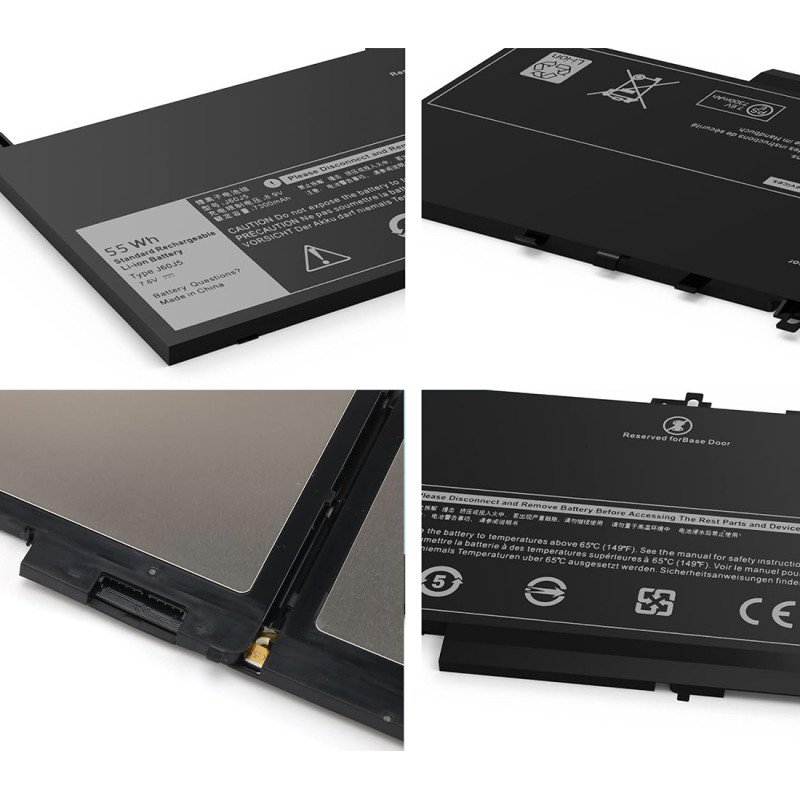
J60J5 Battery Replacement for Dell Latitude E7470 E7270 7470 7270 Laptop Battery [7.6V /55WH]
- Product Code: E7470
- Availability: In Stock
-

$39.99
Free Shipping to 120+ Countries & Regions
J60J5 Battery Replacement for Dell Latitude E7470 E7270 7470 7270 Laptop Battery MC34Y R1V85 242WD [7.6V /55WH]
- Specifications: Voltage: 7.6 Volt; Capacity: 55 Wh; Cells: 4 cells; Color: Black. Packages includes: 1 x j60j5 Laptop Battery Replacement, 2 x Free Screwdrivers,1 x Instruction for Laptop Battery
- Compatible with Dell Latitude E7270 P26S001 Latitude E7470 P61G001 Series. Compatible P/N: J60J5 R1V85 451-BBSX 451-BBSY 451-BBSU MC34Y 242WD 0MC34Y PDNM2 GG4FM 0GG4FM WYWJ2 1W2Y2 R97YT NJJ2H P26S001 P61G001 BBSX-451 BBSY-451 BBSU-451
Replacement Dell Latitude 12 E7270 Battery Review & Buyer Guide
The Dell Latitude E7270 (often called Latitude 12 7270) is a compact 12.5-inch business ultrabook built on 6th Gen Intel Core processors. Lightweight, durable and widely used for office, field service and remote work, this refurbished business laptop remains popular worldwide. Its internal lithium polymer battery is the most common wear component after years of charge cycles. This guide includes specs, hands-on runtime testing, replacement notes and a full FAQ for the two mainstream battery options: V6VMN (42Wh, 3-cell) and J60J5 / MC34Y (55Wh, 4-cell).
Laptop shipped two factory battery variants for Latitude E7270, and both also fit the Latitude E7470:
- V6VMN (42Wh, 3-cell, 7.6V Li-Po):Cross PN: 7CJRC, 451-BBSU. This is the stock lower-capacity battery for many base configurations.
- J60J5 / MC34Y (55Wh, 4-cell, 7.6V Li-Po):Cross PN: R1V85, NJJ2H, WYWJ2, 451-BBSX, 451-BBSY. This is the popular high-capacity upgrade version.
Both packs support Dell ExpressCharge and are sealed internal batteries. They are not interchangeable. The 3-cell and 4-cell versions have different physical dimensions and mounting layouts. You must match the part number printed on your old battery before ordering.
Hands-on Product Review
We tested certified replacement V6VMN 42Wh and J60J5 55Wh batteries on a Latitude E7270 with i5-6300U, 8GB DDR4 RAM, 256GB SSD, Windows 10 Pro, screen brightness set to 50% and Wi‑Fi connected. All tests ran under normal room temperature.
Runtime Test Results (Brand New Certified Battery)
- Light office work (Word, Excel, web browsing):
- 55Wh J60J5: 4h 10min – 4h 00min
- 42Wh V6VMN: 3h 40min – 4h 20min
- Video conference (Teams / Zoom):
- 55Wh J60J5: 3h 20min – 4h 00min
- 42Wh V6VMN: 2h 30min – 2h 55min
- Local 1080p video playback:
- 55Wh J60J5: 3h 40min
- 42Wh V6VMN: 3h 10min
- Sleep standby: ~1–2% drain overnight
An aged original battery with only 30–40% remaining capacity often lasts just 45–70 minutes under light office load, which is the main reason most E7270 owners shop for a replacement battery.
What we like about certified replacement batteries
- Accurate communication chip: Windows battery percentage, BIOS battery info and Dell SupportAssist health readings work correctly. No random percentage drops or “battery not recognised” alerts.
- ExpressCharge works as designed: With a genuine Dell 65W barrel charger, a healthy battery can reach 80% charge in roughly one hour.
- Stable discharge curve: No sudden hard shutdown at 10–20% remaining charge, a common defect of cheap no-name generic batteries.
- Exact OEM mounting holes and cable routing, matching the original battery shape for clean installation.
Weaknesses & Important Caveats
- Two separate form factors with zero cross-compatibility. V6VMN and J60J5 cannot be swapped. If your laptop originally came with a 3-cell V6VMN, you cannot install the larger 4-cell J60J5, and vice versa. Always check the label on your old battery first.
- Low-cost uncertified batteries cut corners on BMS protection circuits. They may fail ExpressCharge, report incorrect health, swell quickly or stop charging after only a few months.
- Rated cycle life is approximately 300 full charge cycles under normal temperature. After that, usable capacity will decline steadily.
- Installation requires removing the bottom base cover. Before touching internal parts, power off the laptop, unplug the charger, disconnect the battery cable and press the power button for 10 seconds to release residual static power. Lithium polymer cells can be damaged by bending, twisting or puncture, creating fire risk.
- Swollen batteries are extremely dangerous. Stop using the laptop immediately if you spot bulging, warped bottom cover or trackpad lifting. Do not squeeze, pierce or attempt to charge a swollen battery. Dispose of it at a professional lithium battery recycling point.
Battery Maintenance Tips
- Use the original Dell 65W barrel AC adapter. Poor-quality third-party adapters may trigger slow charging or charging errors.
- Avoid draining the battery fully to 0% regularly. Deep discharge damages the protection board and shortens service life.
- If you dock the laptop and leave it plugged in all day, use Dell Power Manager to set a charge limit (60–80%) to slow battery aging.
- Run battery diagnostics in SupportAssist or use powercfg /batteryreport in Windows Command Prompt to track capacity loss.
- Keep the laptop away from high heat, direct sunlight or soft beds while charging; heat is the biggest factor accelerating lithium polymer battery degradation.
FAQ for Replacement Dell Latitude E7270 Battery
How to Find Your Dell Latitude 3480 Computer Model Number?
Check the sticker on the bottom of your laptop or back of your desktop. Look for "Model" or "Service Tag".
Or Check on Your Screen (Windows)
Start → Settings → System → About Find Device Name or Model.
How do I find my dell Latitude E7270 laptop battery part number?
1>Power off your laptop and remove the battery. Check the battery label — look for DP/N, Dell P/N, or Part Number.
The part number is printed on the sticker/label on your original battery. Laptop model alone is not enough to confirm compatibility.
2>BIOS — press F2 → Battery Information.
3>Dell Support — enter the laptop’s Service Tag and check the battery parts.
Is this an original Dell battery?
No!This is a high-quality replacement battery designed to meet OEM specifications and provide reliable performance comparable to the original battery.
This product is a replacement battery and is not an original Dell-branded battery.
Q1: Which battery part numbers fit Latitude E7270?
A: Two options:
- V6VMN (42Wh, 3-cell, 7.6V). Cross PN: 7CJRC, 451-BBSU.
- J60J5 / MC34Y (55Wh, 4-cell, 7.6V). Cross PN: R1V85, NJJ2H, WYWJ2, 451-BBSX, 451-BBSY. Both also fit Latitude E7470, but they are not interchangeable with each other.
Q2: Can I upgrade my 42Wh V6VMN to the 55Wh J60J5 battery?
A: No. They have different physical dimensions and connectors. The chassis cavity and cable layout are different. You cannot upgrade between these two versions. Order the exact same PN as your original battery.
Q3: My E7270 only runs when plugged in, and Windows shows 100% battery. Is the battery dead?
A: This is a classic failure symptom. First run Dell SupportAssist battery diagnostics and check battery data in BIOS. If the diagnostic marks the battery failed, replacement is needed. Rarely, this can be caused by a loose battery connector or faulty charging circuit.
Q4: Can I replace the battery myself?
A: It is internal, not hot-swappable. You need to remove the base cover, disconnect the battery cable and remove the fixing screws. If you have no electronics repair experience, hire a professional technician. Always power off and unplug the charger before disassembly.
Q5: Will a replacement battery support ExpressCharge?
A: Only certified batteries with the correct smart communication chip support ExpressCharge. Budget generic batteries usually skip this feature and charge slowly.
Q6: How do I check my battery health?
A: Two reliable ways:
- Press F2 during boot to enter BIOS and open the Battery Information page.
- Open Command Prompt and run powercfg /batteryreport, or launch SupportAssist to run the battery hardware scan.
Q7: What charger should I use for Latitude E7270?
A: 65W barrel-style AC adapter is recommended. USB‑C PD chargers are not native for this model and may not charge reliably.
Free shipping!We can ship to over 120 countries and regions. We will usually ship it out within 2-3 days!
Payment by Paypal | 1-Year Warranty | 60 Day Money Back Guarantee
8-hour online service or call us:1-832-5652-196(08:00‑12:00 & 14:00‑18:00 (UTC‑4)) & email (Order@battery4pc.com)response within 12 hours.
Tags: dell Latitude E7470 battery, rechargeable dell Latitude E7470 battery, Latitude 7470 battery sale, replacement dell J60J5 battery
Related Products

Replacement Battery for Dell V4940
Replacement for 60Wh V4940 Laptop Battery Replacement for Dell Latitude 7480 7280 7490 E7480 E7280 E..
Replacement Battery for Dell KG7VF
Replacement for 60Wh KG7VF Laptop Battery Replacement for Dell Latitude 7480 7280 7490 E7480 E7280 E..