
Blog
Refine Search
How to Disassemble DELL Latitude 7420/Latitude 7420 2in1 Battery
- By John Doe
- 10/10/2026
- 0 comments
How to Disassemble DELL Latitude 7420/Latitude 7420 2in1 Battery Removing the base cover Prerequisites 1. Follow the procedure in before working inside your computer. 2. Remove the microSD card. 3. Enter the service mode. Steps 1. Loosen the eight captive screws that secure the base cover to the computer. 2. Use a plastic scribe to pry open the base cover, starting from the U-shaped recesses near the hinges at the top edge of the base cover. CAUTION: Do not slide the scribe through the edge of the top side of the base cover as it damages the latches inside the base cover. ..
How to Disassemble DELL Latitude 5410/Latitude 5510 Battery
- By John Doe
- 10/10/2026
- 0 comments
How to Disassemble DELL Latitude 5410/Latitude 5510 Battery Removing the base cover Prerequisites 1. Follow the procedure in before working inside your computer. 2. Remove the microSD card. Steps 1. Loosen the eight captive screws that secure the base cover to the computer. 2. Using a plastic scribe [1], pry the base cover from the top-left corner and continue to work on the sides to open the base cover [2]. 3. Lift and remove the base cover away from the computer. Battery Lithium-ion battery precautions CAUTION: ● Exercise caution when handling Lithium-ion batteries. ●..
How to Disassemble DELL Latitude 5400/Latitude 5500 Battery
- By John Doe
- 09/10/2026
- 0 comments
How to Disassemble DELL Latitude 5400/Latitude 5500 Battery Base cover Removing the base cover Prerequisites 1. Follow the procedure in before working inside your computer. 2. Remove the microSD card. Steps 1. Loosen the eight captive screws that secure the base cover to the computer. 2. Using a plastic scribe [1], pry the base cover from the top-left corner and continue to work on the sides to open the base cover . 3. Lift and remove the base cover away from the computer. Remove Battery (Rechargeable Li-ion battery precautions CAUTION: ● Exercise caution when..
How to Disassemble DELL Latitude E5580 Battery
- By John Doe
- 08/10/2026
- 0 comments
How to Disassemble DELL Latitude E5580 Battery Dell Latitude E5580 (P73G) vs E5480 (P72G) Disassembly Comparison The overall dis‑and‑reassembly procedure and design logic are identical (same‑generation internal architecture). However, the housing, heat sink and motherboard are not interchangeable; the layout and physical dimensions of internal components differ. Similar Points (Service Procedures) Bottom cover: Both models feature captive screws. Simply loosen the screws, then pry along the retaining clips to remove the D‑shell. After opening the base, disconnect the battery cable first..
How to Disassemble DELL Latitude E5480 Battery
- By John Doe
- 08/10/2026
- 0 comments
How to Disassemble DELL Latitude E5480 Battery Removing base cover Steps 1. Follow the procedure in Before working inside your computer. 2. To remove the base cover: a. Loosen the M2.5*8 captive screws that secure the base cover to the computer b. Pry the base cover from the edge and lift the base cover away from the computer [2]. NOTE: You may need a plastic scribe to pry the base cover from the edges Remove Battery Lithium-ion battery precautions CAUTION: ● Exercise caution when handling Lithium-ion batteries. ● Discharge the battery completely before removing it. Dis..
How to Disassemble DELL Latitude E5470 Battery
- By John Doe
- 19/09/2026
- 0 comments
Dell Latitude E54750 Battery Removal Shut down the laptop completely. Disconnect the AC power adapter from the wall socket and the notebook. Remove all external peripherals including USB devices, SD cards and docking connectors. Close the LCD display lid. Flip the laptop upside‑down and rest it on a soft, non‑abrasive anti‑static work surface. Loosen all captive screws securing the base cover. 4.Use a plastic pry tool to gently release the base‑cover clips, then lift and take off the base cover from the chassis. Disconnect the battery ca..
How to Disassemble or replacement for DELL Latitude E5450 Battery
- By John Doe
- 18/09/2026
- 0 comments
Dell Latitude E5450 Battery Removal Shut down the laptop completely. Disconnect the AC power adapter from the wall socket and the notebook. Remove all external peripherals including USB devices, SD cards and docking connectors. Close the LCD display lid. Flip the laptop upside‑down and rest it on a soft, non‑abrasive anti‑static work surface. Loosen all captive screws securing the base cover. 4.Use a plastic pry tool to gently release the base‑cover clips, then lift and take off the base cover from the chassis. 5.Flip the laptop right‑side‑up, open th..
How to Disassemble or replacement for DELL Dell Precision 5510 and precision 5520 Battery,fan,keyboard and system
- By John Doe
- 10/09/2026
- 0 comments
How to Disassemble or replacement for DELL Dell Precision 5510 and precision 5520 Battery,fan,keyboard and system Removing the Base Cover 1. Follow the procedures in Before Working Inside Your Computer. 2. Close the display and turn the computer over. 3. Turn the system badge flap over and then remove the screws that secure the base cover to the computer. NOTE: Use a #5 screwdriver for the base screws and a screwdriver for the screws inside the badge flap. 4. Pry the edges base cover and lift it to remove it from computer . Removing the Battery NOTE:..
How to Disassemble or replacement for DELL G7 7590 battery,keyboard and system board
- By John Doe
- 08/09/2026
- 0 comments
How to Disassemble or replacement for DELL G7 7590 battery,keyboard and system board (1: Dell G5‑5590 (P82F001) The disassembly procedure, screw layout and internal structure are virtually identical. The disassembly steps in the official service manual are nearly the same. Only the outer casing appearance, cooling module specifications and power supply configuration differ. Operations such as dust cleaning, RAM / SSD replacement and motherboard removal are fully interchangeable, so repair guides can be used for either model. Differences: The G7‑7590 features a metal bottom cover paired w..
How to Disassemble Dell G15 5520 Laptop Battery,Keyboard and System Board
- By John Doe
- 06/09/2026
- 0 comments
How to Disassemble Dell G15 5520 Laptop Battery,Keyboard and System Board (Standard disassembly sequence: Remove the base cover → Disconnect the battery cable → SSD / Wireless‑LAN card / RAM → Cooling fan and heatsink assembly → I/O board → Motherboard → C‑shell keyboard and palm‑rest assembly ✅ Nearly identical disassembly procedures (same P105F chassis family) Dell G15‑5521 SE (P105F007 / P105F008) Identical screw layout, base‑cover latch design and full disassembly workflow. It only adds RGB lighting and upgraded power & cooling hardware; repair guides are fully interchangea..
How to Disassemble DELL G5 SE 5505 Battery,fan, KEYBOARD and motherboard
- By John Doe
- 06/09/2026
- 0 comments
How to Disassemble DELL G5 SE 5505 Battery,fan, KEYBOARD and motherboard Standard disassembly sequence: Remove the bottom cover → Disconnect the battery → SSD / RAM / Wireless‑LAN card → Cooling fan and heatsink assembly → I/O board → Motherboard → C‑shell keyboard and palm‑rest assembly ✅ Nearly identical disassembly procedures (same P89F chassis family) Dell G5‑5500 (P89F003) Identical screw layout, bottom‑cover clip design and component removal sequence. Differences lie only in internal power supply, RGB lighting and cooling hardware specifications. Repair tutorials are fu..
How to Disassemble Dell G15 5515 (Ryzen Edition) Laptop Battery,Keyboard and System Board
- By John Doe
- 06/09/2026
- 0 comments
How to Disassemble Dell G15 5515 Laptop Battery,keyboard for dell g15 5550 and system board. (Models with nearly identical disassembly procedures as the G15‑5510 (same‑generation older chassis) 100 % identical rear‑cover opening logic, screw layout and internal removal‑installation sequence Dell G15 5510 Dell G15 5515 (Ryzen Edition) These three models share the same D‑shell. The rear‑cover removal method, screw positions and snap‑fit clips are exactly the same. Tutorials for RAM, SSD, battery and fan replacement are fully interchangeable, and their service manuals feature larg..
How to Disassemble Dell G15 5511 Laptop Battery,Keyboard and System Board
- By John Doe
- 06/09/2026
- 0 comments
How to Disassemble Dell G15 5511 Laptop Battery,keyboard for dell g15 5510 and system board. (Models with nearly identical disassembly procedures as the G15‑5510 (same‑generation older chassis) 100 % identical rear‑cover opening logic, screw layout and internal removal‑installation sequence Dell G15 5510 Dell G15 5515 (Ryzen Edition) These three models share the same D‑shell. The rear‑cover removal method, screw positions and snap‑fit clips are exactly the same. Tutorials for RAM, SSD, battery and fan replacement are fully interchangeable, and their service manuals featur..
How to Disassemble Dell G15 5510 Laptop Battery,keyboard and system board
- By John Doe
- 04/09/2026
- 0 comments
How to Disassemble Dell G15 5510 Laptop Battery,keyboard for dell g15 5510 and system board. (Models with nearly identical disassembly procedures as the G15‑5510 (same‑generation older chassis) 100 % identical rear‑cover opening logic, screw layout and internal removal‑installation sequence Dell G15 5511 (11th‑gen Intel) Dell G15 5515 (Ryzen Edition) These three models share the same D‑shell. The rear‑cover removal method, screw positions and snap‑fit clips are exactly the same. Tutorials for RAM, SSD, battery and fan replacement are fully interchangeable, and their service man..
How to Disassemble DELL G5‑5500 Battery, keyboard or system board
- By John Doe
- 04/09/2026
- 0 comments
How to Disassemble or replacement for DELL G5 5500 battery,keyboard and motherboard (The model DELL G3 3500,G3 3590 and G5 5500 :Disassembly workflow nearly identical (sharing the same P89F major platform) Dell G3‑3590 (P89F001): The latch layout of the bottom cover, screw specifications for the D‑shell, arrangement of internal components and disassembly sequence are highly consistent. The only differences lie in 9th‑gen / 10th‑gen CPUs and minor‑revision motherboards. Guides for dust cleaning, RAM/SSD/battery replacement are fully interchangeable. Dell G5‑5500 (also on the P8..
How to Disassemble DELL G3 3590 Battery,fan, KEYBOARD and motherboard
- By John Doe
- 04/09/2026
- 0 comments
How to Disassembly or replacement for DELL G3 3590 KEYBOARD and motherboard 1>Disassembly Bottom and Battery of Laptop Unplug the computer from the charging cable. Close the laptop and flip it over to the back. Find the 10 screws on the outer edge. Loosen the four captive screws(Red Mark) that secure the base cover to the palm-rest and keyboard assembly. Remove the six screws (Yellow Mark) that secure the base cover to the palm-rest and keyboard assembly. Using a plastic scribe, pry the base cover beside the display hinges, and then continue to work on the..
How to Disassemble or replacement for DELL G3 3579 Laptop Battery,keyboard and motherboard
- By John Doe
- 03/09/2026
- 0 comments
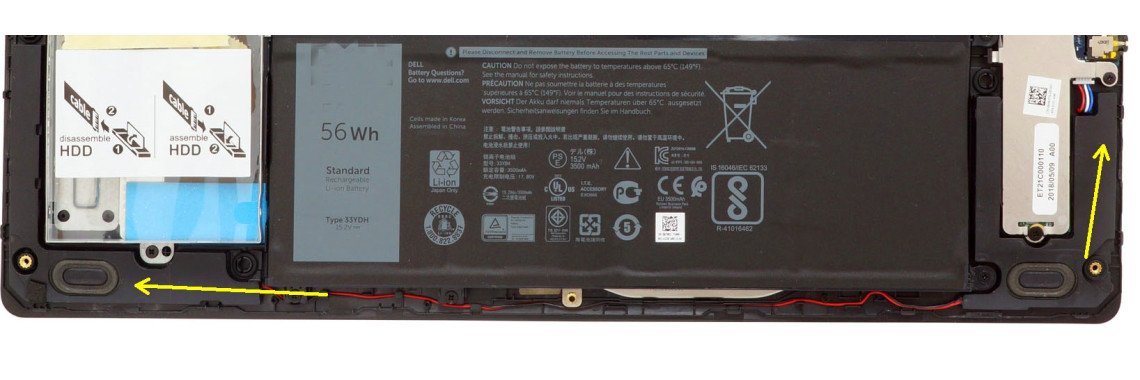
How to Disassemble or replacement for DELL G3 3579 Laptop Battery,keyboard and motherboard (Nearly identical disassembly procedures (same‑generation DELL G3 3579 Laptop models) Dell G3‑3779 (17‑inch G3) The procedures for removing the bottom cover, disconnecting the power, taking out the battery, hard drive and wireless card, as well as detaching the C‑shell and keyboard assembly are exactly the same. Only the chassis size and cooling module differ. Dell G5‑5587 It shares the same screw‑locking mechanism for the outer casing and C‑shell removal method. The internal cable layout is h..
How to Disassemble or replacement for DELL G3 3500 KEYBOARD AND MOTHERBOARD
- By John Doe
- 01/09/2026
- 0 comments
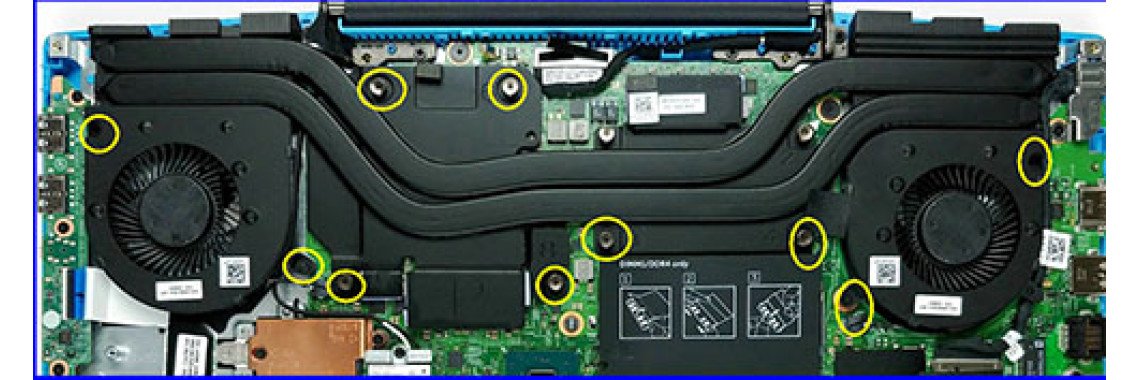
How to Disassemble or replacement for DELL G3 3500 KEYBOARD and motherboard 1>Disassembly Bottom and Battery of Laptop Unplug the computer from the charging cable. Close the laptop and flip it over to the back. Find the 10 screws on the outer edge. Loosen the four captive screws(Red Mark) that secure the base cover to the palm-rest and keyboard assembly. Remove the six screws (Yellow Mark) that secure the base cover to the palm-rest and keyboard assembly. Using a plastic scribe, pry the base cover beside the display hinges, and then continue to work on the sides..
How to Disassemble or replacement for DELL G3 3590 Battery
- By John Doe
- 31/08/2026
- 0 comments
How to Disassemble or replacement for DELL G3 3590 Battery Unplug the computer from the charging cable. Close the laptop and flip it over to the back. Find the 10 screws on the outer edge. Loosen the four captive screws(Red Mark) that secure the base cover to the palm-rest and keyboard assembly. Remove the six screws (Yellow Mark) that secure the base cover to the palm-rest and keyboard assembly. Using a plastic scribe, pry the base cover beside the display hinges, and then continue to work on the sides to open the base cover. (which on dell g3 3590 laptop model ..
How to Disassemble or replacement for DELL G3 3500 Battery
- By John Doe
- 31/08/2026
- 0 comments
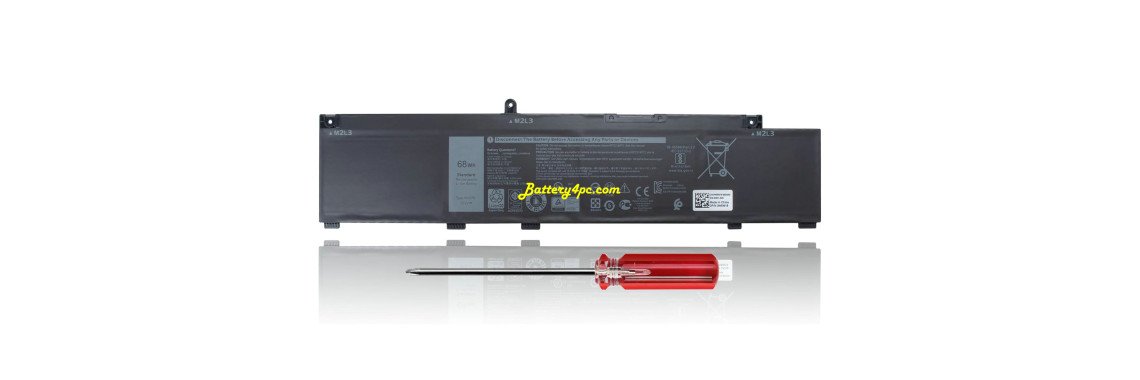
How to Disassemble or replacement for DELL G3 3500 Battery Unplug the computer from the charging cable. Close the laptop and flip it over to the back. Find the 10 screws on the outer edge. Loosen the four captive screws(Red Mark) that secure the base cover to the palm-rest and keyboard assembly. Remove the six screws (Yellow Mark) that secure the base cover to the palm-rest and keyboard assembly. Using a plastic scribe, pry the base cover beside the display hinges, and then continue to work on the sides to open the base cover. (which on dell g3 3500 laptop model ..
Blog

How to Disassemble or replacement for DELL Latitude E5450 Battery
Dell Latitude E5450 Battery Removal Shut down the laptop completely. Disconnect the AC power adapter from the wall socket and the notebook. Remove all external peripherals including USB devices, SD cards and docking connectors. Close the LCD display lid. Flip the laptop upside‑down and rest it on a soft, non‑abrasive anti‑static work surface. Loosen all captive screws securing the base cover. 4.Use a plastic pry tool to gently release the base‑cover clips, then lift and take off the base cover from the chassis. 5.Flip the laptop right‑side‑up, open th..
How to Disassemble or replacement for DELL G7 7590 battery,keyboard and system board
How to Disassemble or replacement for DELL G7 7590 battery,keyboard and system board (1: Dell G5‑5590 (P82F001) The disassembly procedure, screw layout and internal structure are virtually identical. The disassembly steps in the official service manual are nearly the same. Only the outer casing appearance, cooling module specifications and power supply configuration differ. Operations such as dust cleaning, RAM / SSD replacement and motherboard removal are fully interchangeable, so repair guides can be used for either model. Differences: The G7‑7590 features a metal bottom cover paired w..
How to Disassemble or replacement for DELL G3 3590 Battery
How to Disassemble or replacement for DELL G3 3590 Battery Unplug the computer from the charging cable. Close the laptop and flip it over to the back. Find the 10 screws on the outer edge. Loosen the four captive screws(Red Mark) that secure the base cover to the palm-rest and keyboard assembly. Remove the six screws (Yellow Mark) that secure the base cover to the palm-rest and keyboard assembly. Using a plastic scribe, pry the base cover beside the display hinges, and then continue to work on the sides to open the base cover. (which on dell g3 3590 laptop model ..
How to Disassemble or replacement for DELL G3 3579 Laptop Battery,keyboard and motherboard
How to Disassemble or replacement for DELL G3 3579 Laptop Battery,keyboard and motherboard (Nearly identical disassembly procedures (same‑generation DELL G3 3579 Laptop models) Dell G3‑3779 (17‑inch G3) The procedures for removing the bottom cover, disconnecting the power, taking out the battery, hard drive and wireless card, as well as detaching the C‑shell and keyboard assembly are exactly the same. Only the chassis size and cooling module differ. Dell G5‑5587 It shares the same screw‑locking mechanism for the outer casing and C‑shell removal method. The internal cable layout is h..
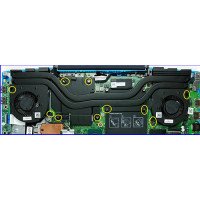
How to Disassemble or replacement for DELL G3 3500 KEYBOARD AND MOTHERBOARD
How to Disassemble or replacement for DELL G3 3500 KEYBOARD and motherboard 1>Disassembly Bottom and Battery of Laptop Unplug the computer from the charging cable. Close the laptop and flip it over to the back. Find the 10 screws on the outer edge. Loosen the four captive screws(Red Mark) that secure the base cover to the palm-rest and keyboard assembly. Remove the six screws (Yellow Mark) that secure the base cover to the palm-rest and keyboard assembly. Using a plastic scribe, pry the base cover beside the display hinges, and then continue to work on the sides..